AI Inbound Routing
AI Inbound Routing connects an inbound trunk path to the AI voice agent that should answer incoming calls.
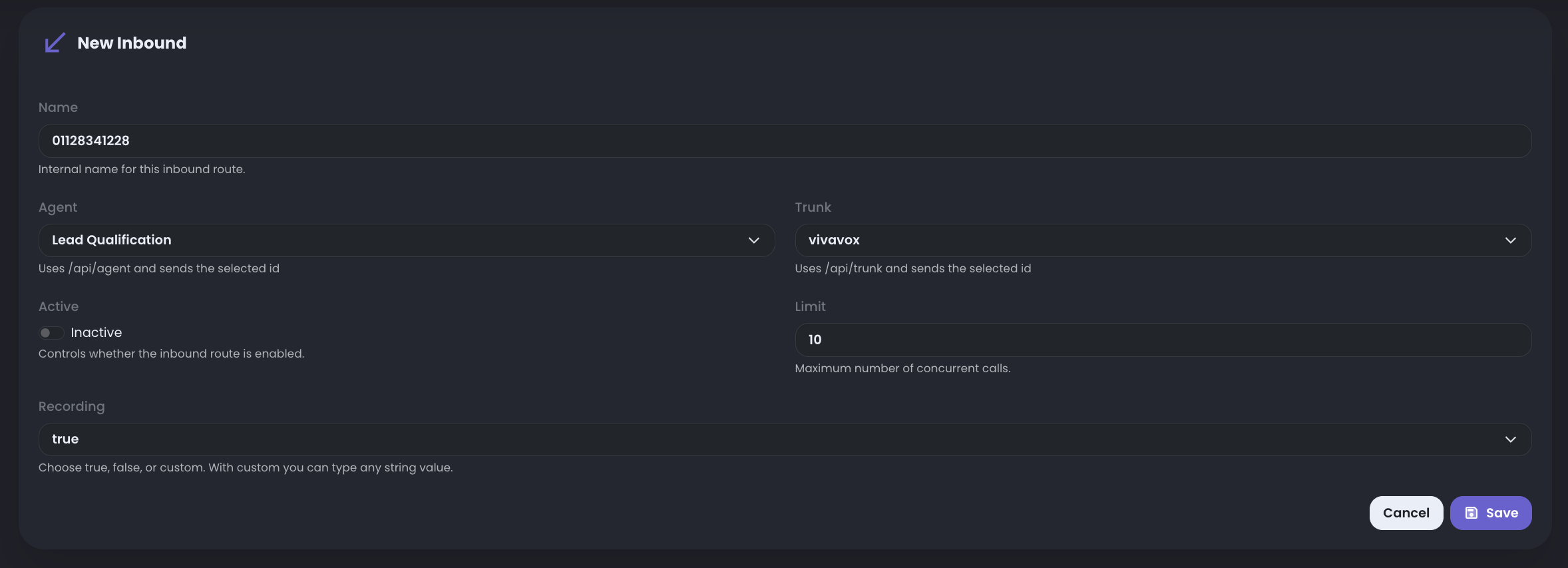
This is where the route becomes operational: select the trunk that receives the call, select the agent that should answer, then set how many concurrent calls that agent can handle through this route.
What you need before routing
Before configuring the route, make sure the telephony path and the agent are ready.
- the AI voice agent already exists
- the prompt and greeting have been configured
- transfer, hangup, or fallback behavior is available if the workflow needs it
- the inbound trunk is configured, enabled, and registered
- the expected concurrent call capacity for the first test is clear
Basic routing setup
Path to follow: Inbound AiAI Inbound Routing Then create or edit the inbound route.
- Trunk: select the inbound trunk or entry point that receives the call from the telephony provider or PBX.
- Agent: select the AI voice agent that must answer calls arriving through that trunk.
- Active: enable or disable the inbound route without deleting its configuration.
- Concurrent calls: set the maximum number of simultaneous calls the selected agent can handle on this inbound route. Calls that exceed this limit are returned as busy.
What to verify
After saving the route, place a controlled inbound test call and confirm the full path.
- the call enters through the expected trunk
- the route sends the call to the expected agent
- the greeting starts as expected
- the prompt behavior matches the intended use case
- transfer or hangup logic works when requested
- the concurrent call limit is not higher than what the agent, trunk, and deployment can handle
Routing review questions
If the inbound route is not behaving correctly, review the routing layer before changing the prompt.
- is the correct trunk selected?
- is the correct agent selected?
- is the trunk registered and reachable?
- is the concurrent call limit too high or too low for the current test?
- does the agent have the required functions for transfer, callback, or hangup?
Keep the first route narrow
Avoid combining too many scenarios in the first inbound configuration.
It is easier to validate one clear route than to debug multiple agents, trunks, fallback paths, and concurrency changes at the same time.